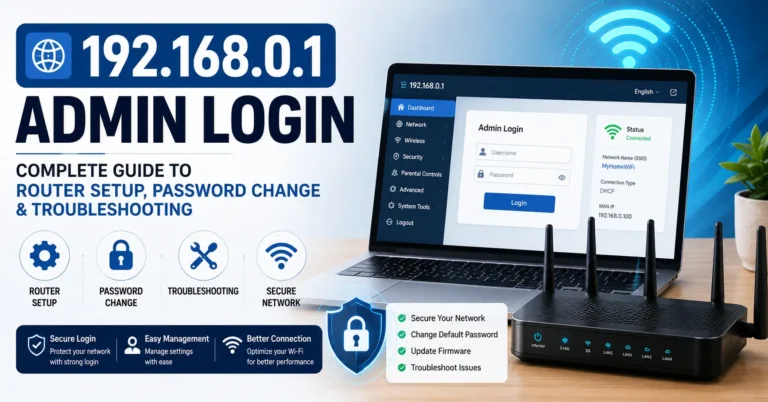
Default Router Username and Password List (2026 Complete Guide)
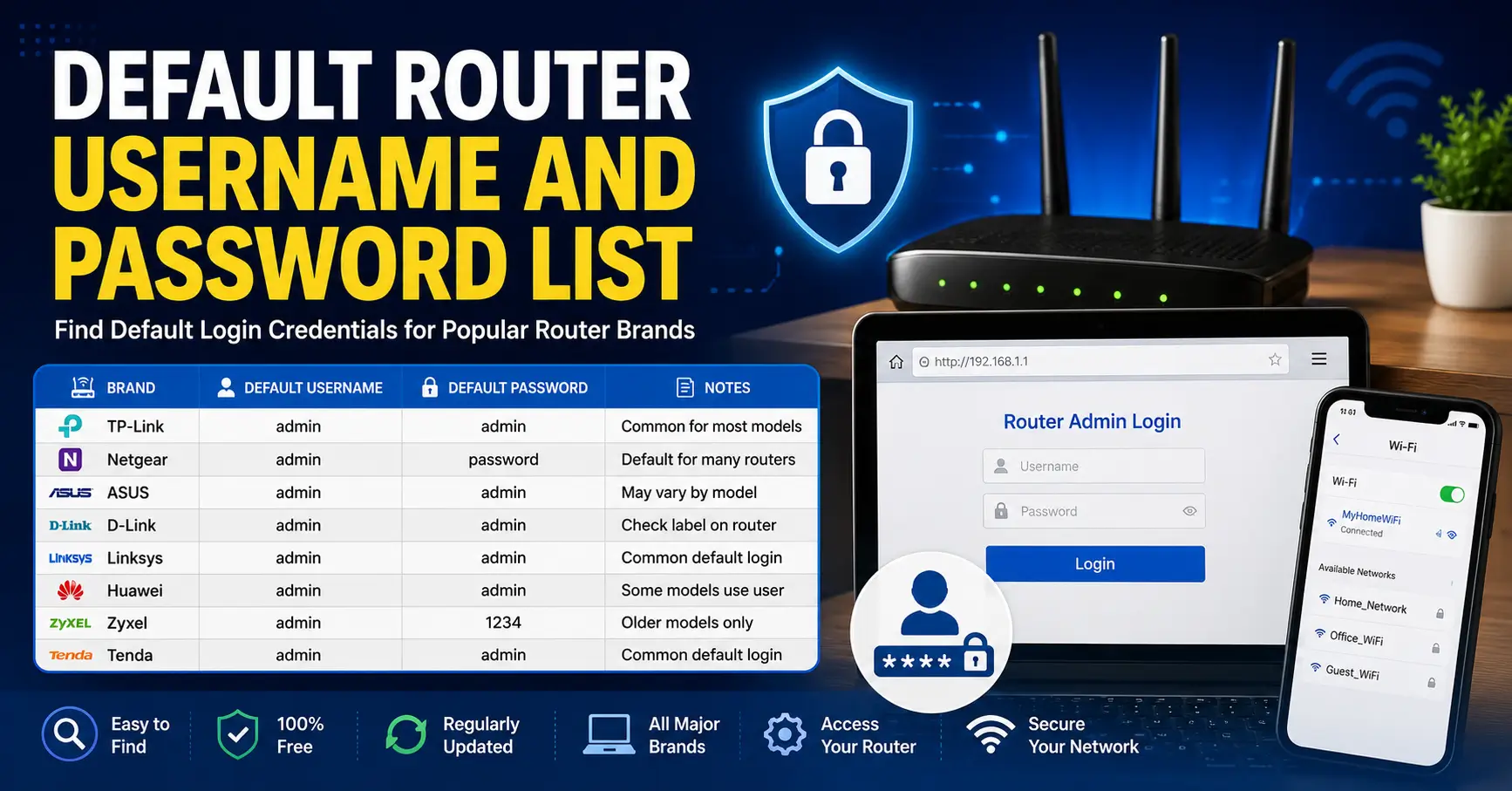
Default Router Username and Password List helps you find the default login credentials for popular router brands, including TP-Link, Netgear, ASUS, D-Link, Linksys, Huawei, Cisco, and Arris. Use this guide to access your router’s admin panel, change Wi-Fi settings, update security, troubleshoot network issues, or restore factory defaults with the correct username, password, and default IP address.
Quick Answer Box
Most routers use one of these default logins:
- Username:
admin| Password:admin - Username:
admin| Password:password - Username:
admin| Password: (blank) - Login IP:
192.168.1.1or192.168.0.1
If these don’t work, check the sticker on the back or bottom of your router — manufacturers print the exact default credentials there. If someone has changed the password before and you’re locked out, a factory reset restores the original defaults.
Default Router Username and Password List
Choose your router brand from the list below to see its default username, password, and login protocol.
| Brand | Model | Protocol | Username | Password |
|---|---|---|---|---|
| 3COM | COREBUILDER 7000/6000/3500/2500 | TELNET | debug | synnet |
| 3COM | HIPERARC V4.1.X | TELNET | adm | (none) |
| 3COM | NETBUILDER | MULTI | admin | (none) |
| 3COM | OFFICECONNECT ADSL WIRELESS 11G | HTTP | (none) | admin |
| 3COM | INTERNET FIREWALL 3C16770 | HTTP | admin | password |
| 3COM | SUPERSTACK 3 4XXX | MULTI | admin | (none) |
| 3COM | WIRELESS AP ANY | MULTI | admin | comcomcom |
| 2WIRE | HOMEPORTAL SBC YAHOO! DSL | HTTP | 2Wire | (none) |
| 2WIRE | ALL WIFI ROUTERS | HTTP | (none) | Wireless |
| ACTIONTEC | Most models | HTTP | admin | password |
| ACTIONTEC | GT704WG | HTTP | admin | password |
| ACTIONTEC | MI424WR (Verizon FiOS) | HTTP | admin | (printed on label) |
| ASUS | Most models | HTTP | admin | admin |
| ASUS | RT-AC66U / RT-AC68U / RT-AC87U | HTTP | admin | admin |
| ASUS | RT-AX56U / RT-AX58U / RT-AX86U | HTTP | admin | admin |
| ASUS | ZenWiFi AX (XT8) | HTTP | admin | admin |
| BELKIN | Most models | HTTP | (blank) | (blank) |
| BELKIN | F7D4301 / F7D4302 (N600 DB) | HTTP | admin | (blank) |
| BILLION | BiPAC series | HTTP | admin | admin |
| BUFFALO | Most AirStation models | HTTP | admin | password |
| BUFFALO | WZR-1750DHP / WZR-1900DHP | HTTP | admin | password |
| CISCO | RV042 / RV082 / RV320 / RV325 | HTTP | admin | admin |
| CISCO | RV110W / RV130W / RV160W | HTTP | cisco | cisco |
| CISCO | Aironet 1100 series | HTTP | (none) | Cisco |
| CISCO | VPN Concentrator 3000 | MULTI | admin | admin |
| COMTREND | CT-536+ / WR-5887 | HTTP | admin | admin |
| COMTREND | AR-5389 / CT-5364A | HTTP | root | 12345 |
| D-LINK | DIR-300 / DIR-600 / DIR-615 | HTTP | admin | (blank) |
| D-LINK | DIR-655 / DIR-825 / DIR-835 | HTTP | admin | (blank) |
| D-LINK | DIR-860L / DIR-868L / DIR-880L | HTTP | admin | (blank) |
| D-LINK | DSR-250 / DSR-500 (business) | HTTP | admin | admin |
| DRAYTEK | Vigor (current firmware) | HTTP | admin | admin |
| DRAYTEK | Vigor 2600 (older) | HTTP | admin | (none) |
| EDIMAX | Most models | HTTP | admin | 1234 |
| HUAWEI | Most retail models | HTTP | admin | admin |
| HUAWEI | HG532 / HG659 (DSL gateways) | HTTP | admin | admin |
| HUAWEI | HG8010 / HG8045A (GPON ONT) | HTTP | telecomadmin | admintelecom |
| LINKSYS | WRT54G / WRT54GS | HTTP | (blank) | admin |
| LINKSYS | E1200 / E2500 / E3200 | HTTP | admin | admin |
| LINKSYS | WRT1900AC / WRT3200ACM | HTTP | admin | admin |
| MIKROTIK | Most RouterBOARD models | HTTP | admin | (blank) |
| MIKROTIK | hAP / hAP ac / hAP ax | HTTP | admin | (printed on label) |
| MOTOROLA | Most Surfboard gateways | HTTP | admin | password |
| MOTOROLA | WR850G | HTTP | admin | motorola |
| NETGEAR | Most models (current) | HTTP | admin | password |
| NETGEAR | R7000 (Nighthawk) | HTTP | admin | password |
| NETGEAR | Orbi RBR50 | HTTP | admin | password |
| NETGEAR | WNDR3700 / WNDR4300 | HTTP | admin | password |
| PLANET | Most models | HTTP | admin | admin |
| PLANET | ADE-4000 / ADE-4110 | HTTP | admin | epicrouter |
| SAGEM | F@ST 2704 / 2804 / 3686 | HTTP | admin | admin |
| SAGEM | FAST 1400 | MULTI | admin | epicrouter |
| SIEMENS | Gigaset (most models) | HTTP | admin | admin |
| SITECOM | Most models | HTTP | admin | admin |
| SMC | Most Barricade models | HTTP | admin | smcadmin |
| SMC | SMC2804WBR / SMC7004VBR | HTTP | (blank) | smcadmin |
| TENDA | AC15 / AC18 / AC23 | HTTP | admin | admin |
| TENDA | N150 (F3) / N300 (F6) | HTTP | admin | (blank) |
| THOMSON | SpeedTouch (most models) | HTTP | admin | (blank) |
| TRENDNET | Most models | HTTP | admin | admin |
| TRENDNET | TEW-818DRU / TEW-827DRU | HTTP | admin | admin |
| U.S. ROBOTICS | Most models | HTTP | admin | admin |
| U.S. ROBOTICS | SureConnect ADSL | TELNET | support | support |
| UBEE | Most models (cable gateways) | HTTP | user | user |
| UNIDEN | Most models | HTTP | UNIDEN | (blank) |
| VIRGIN MEDIA | Hub 3 / Hub 4 / Hub 5 | HTTP | admin | (printed on label) |
| VODAFONE | Most models | HTTP | root | 123456 |
| VODAFONE | Vodafone-Box | HTTP | vodafone | vodafone |
| APPLE | AirPort Express / Extreme / Time Capsule | HTTP | (app only) | (app only) |
| APPLE | Airport Extreme Base Station | MULTI | n/a | admin |
| HP | Most models | HTTP | admin | admin |
| HP | Admin access | HTTP | admin | !admin |
| IBM | BladeCenter Mgmt Console | HTTP | USERID | PASSW0RD |
| IBM | Remote Supervisor Adapter | HTTP | USERID | PASSW0RD |
| JUNIPER | ISG2000 | MULTI | netscreen | netscreen |
| MICROSOFT | Most | MULTI | Administrator | (blank) |
| NOKIA | MW1122 | MULTI | telecom | telecom |
| NORTEL | VPN Gateway | CONSOLE | admin | admin |
| NORTEL | Contivity Extranet VPN | HTTP | admin | setup |
| ORACLE | Oracle RDBMS | MULTI | system | manager |
| ORANGE | Most models | HTTP | admin | admin |
| PANASONIC | PBX TDA 100/200/400 | CONSOLE | (none) | (none) |
| SAMSUNG | modem router aht-e300 | MULTI | admin | password |
| SHARP | AR-M355N | HTTP | admin | Sharp |
| SONICWALL | ALL | HTTP | admin | password |
| SUN | Cobalt | HTTP | admin | admin |
| SUN MICROSYSTEMS | ILOM of X4100 | HTTP | root | changeme |
| SWEEX | Most models | HTTP | admin | 1234 |
| WANADOO | Livebox | MULTI | admin | admin |
| WATCHGUARD | firebox 1000 | MULTI | admin | (none) |
| WESTELL | 2200 | MULTI | admin | password |
| XEROX | Multi Function Equipment | MULTI | admin | admin |
| XYLAN | Omniswitch | TELNET | admin | switch |
| YAKUMO | Routers | HTTP | admin | admin |
| ZONET | ZSR4154WS | HTTP | admin | admin |
| ZONET | ZSR1104WE | HTTP | admin | 1234 |
| ZOOM | ZOOM ADSL Modem | CONSOLE | admin | zoomadsl |
| ZTE | Most models | HTTP | admin | admin |
| ZTE | F620 / F660 (GPON ONT) | HTTP | admin | admin |
| ZTE | ZXHN H108N / H208N / H267N | HTTP | admin | admin |
| ZYXEL | Most models | HTTP | admin | 1234 |
| ZYXEL | AMG / VMG DSL gateways | HTTP | admin | 1234 |
| ZYXEL | Prestige 660HW | MULTI | admin | admin |
| NEXXT SOLUTIONS | Most models | HTTP | admin | admin |
| 3M | VOL-0215 | SNMP | volition | volition |
| 3WARE | 3DM | HTTP | Administrator | 3ware |
| ACCELERATED NETWORKS | DSL CPE DSLAM | TELNET | sysadm | anicust |
| ACCTON T-ONLINE | Wireless router | HTTP | none | 0 |
| ACEEX | Modem ADSL Router | HTTP | admin | (none) |
| ADC KENTROX | Pacesetter Router | TELNET | n/a | secret |
| ADIC | Scalar 100/1000 | HTTP | admin | secure |
| ADTRAN | TSU Router Module | TELNET | n/a | (none) |
| ADTRAN | Express 5110/5200 | TELNET | n/a | adtran |
| ADVANTEK NETWORKS | Wireless LAN 802.11 | MULTI | admin | (none) |
| AETHRA | Starbridge EU | HTTP | admin | password |
| ALCATEL | Omnistack/omniswitch | TELNET | diag | switch |
| ALLIED | Most models | HTTP | (blank) | (blank) |
| ALLIED TELESYN | AT-AR130 | HTTP | Manager | friend |
| ALLNET | ALL0275 802.11g AP | HTTP | none | admin |
| ALTEON | AD4 / ACEswitch 180e | HTTP | admin | admin |
| AMBIT | ADSL / ntl home 200 | HTTP | root | root |
| AMITECH | wireless router 802.11g | HTTP | admin | admin |
| APC | UPSes Web SNMP Mgmt Card | HTTP | device | device |
| APC | 9606 Smart Slot | TELNET | n/a | backdoor |
| ARECA | RAID controllers | CONSOLE | admin | admin |
| ASANTE | FM2008 | MULTI | admin | asante |
| ASCEND | Router / Sahara | TELNET | root | ascend |
| ATLANTIS | I-Storm LAN Router ADSL | MULTI | admin | atlantis |
| AVAYA | Cajun Pxxx | MULTI | manuf | xxyyzz |
| AXIS | Webcams / Print Server | HTTP | root | pass |
| AZTECH | DSL-600E | HTTP | admin | admin |
| BAY NETWORKS | Router | CONSOLE | User | (none) |
| BENQ | awl 700 wireless router | MULTI | admin | admin |
| BINTEC | x1200 / x3200 | MULTI | admin | bintec |
| BLUE COAT SYSTEMS | ProxySG | HTTP | admin | articon |
| BROCADE | Fabric OS | MULTI | admin | password |
| BROTHER | NC-3100h | CONSOLE | (none) | access |
| CABLE AND WIRELESS | ADSL Modem Router | MULTI | admin | (none) |
| CANYON | router | MULTI | Administrator | admin |
| CHECKPOINT | SecurePlatform NG | CONSOLE | admin | admin |
| CNET | CSH-2400W | HTTP | admin | (none) |
| COMPAQ | Insight Manager | CONSOLE | administrator | administrator |
| CONEXANT | Router | HTTP | n/a | epicrouter |
| CORECESS | 3113 / Corecess 3112 | HTTP | admin | (none) |
| CTC UNION | ATU-R130 | MULTI | root | root |
| CYBERGUARD | all firewalls | CONSOLE | cgadmin | cgadmin |
| CYCLADES | TS800 | HTTP | root | tslinux |
| DALLAS SEMICONDUCTORS | TINI embedded JAVA Module | TELNET | root | tini |
| DELL | Remote Access Card | HTTP | root | calvin |
| DELL | Laser Printer 3000cn | HTTP | admin | password |
| DEUTSCHE TELEKOM | T-Sinus DSL | HTTP | (none) | (none) |
| DIGICOM | Michelangelo | MULTI | admin | michelangelo |
| DYNALINK | RTA230 | MULTI | admin | admin |
| E-TECH | ADSL Ethernet Router | HTTP | admin | epicrouter |
| EFFICIENT NETWORKS | 5851 SDSL Router | CONSOLE | (none) | hs7mwxkk |
| ERICSSON | BP250 | HTTP | admin | default |
| EXTREME NETWORKS | All Switches | MULTI | admin | (none) |
| F5 | Bigip 540 | MULTI | root | default |
| FORTINET | Fortigate | CONSOLE | maintainer | bcpb |
| FOUNDRY NETWORKS | IronView Network Manager | HTTP | admin | admin |
| FUJITSU SIEMENS | Routers | HTTP | (none) | connect |
| INTEL | Wireless Gateway | HTTP | intel | intel |
| INVENTEL | Livebox | MULTI | admin | admin |
| KONICA MINOLTA | magicolor 5430 DL | HTTP | admin | administrator |
| LANCOM | IL11 | MULTI | n/a | (none) |
| LANTRONIX | SCS400 | MULTI | n/a | admin |
| LG | LAM200E/LAM200R | MULTI | admin | epicrouter |
| MCAFEE | SCM 3100 | MULTI | scmadmin | scmchangeme |
| MICROSOFT | Most | MULTI | Administrator | (blank) |
| MITEL | 3300 ICP | HTTP | system | password |
| NEC | WARPSTAR-BaseStation | TELNET | n/a | (none) |
| NETCOMM | NB1300 | HTTP | admin | password |
| NETOPIA | Netopia 9500 | CONSOLE | netopia | netopia |
| NETSCREEN | Firewall | MULTI | netscreen | netscreen |
| NOKIA | M1921 | TELNET | (none) | nokia |
| OKI | 6120e | HTTP | admin | OkiLAN |
| OLITEC | sx 200 adsl modem router | MULTI | admin | adslolitec |
| OLITEC (TRENDCHIP) | Most models | HTTP | admin | admin |
| PIRELLI | Pirelli Router | MULTI | admin | microbusiness |
| PROXIM | Orinoco 600/2000 | HTTP | (none) | (none) |
| RICOH | Aficio 2232C | TELNET | n/a | password |
| SENAO | 2611CB3+D | HTTP | admin | (none) |
| SIEMENS | ROLM PBX | CONSOLE | eng | engineer |
| SITECOM | Older WiFi routers | HTTP | (blank) | sitecom |
| SONICWALL | ALL | HTTP | admin | password |
| SYMBOL | AP-2412 | MULTI | n/a | Symbol |
| THOMSON | Newer gateways | HTTP | admin | (printed on label) |
Why Default Router Credentials Matter
Every router ships with a factory-set username and password so the manufacturer’s technicians — and you — can access the admin dashboard the first time it’s powered on. This is different from your Wi-Fi password, which is what your phone or laptop uses to join the network.
The admin login gets you into the router’s control panel, where you can:
- Change your Wi-Fi network name (SSID) and password
- Set up port forwarding for gaming or remote access
- Update firmware
- View connected devices
- Configure parental controls
- Troubleshoot connectivity issues
In my experience helping home users and small offices fix network issues, the single most common support request isn’t “my internet is down” — it’s “I can’t log into my router.” Based on commonly reported troubleshooting cases, a large share of these situations come down to one of three things: the router was never reconfigured after purchase, someone changed the password and didn’t document it, or the user is trying the Wi-Fi password instead of the admin password.
Knowing the correct default router username and password list saves you a support call — and, more importantly, helps you close a real security gap. Unchanged default credentials are one of the most exploited weaknesses in home networking, since attackers on the same network (or scanning IP ranges) can try known defaults in seconds.
How to Find Your Router’s IP Address
Before you can log in, you need the router’s local IP address — sometimes called the “gateway IP” or “default gateway.”
On Windows:
- Open Command Prompt.
- Type
ipconfigand press Enter. - Look for “Default Gateway” under your active network adapter.
On macOS:
- Open System Settings > Network.
- Click on your active connection (Wi-Fi or Ethernet) > Details.
- The router’s IP is listed as “Router.”
On Android or iPhone:
- Go to Wi-Fi settings.
- Tap the connected network’s info icon.
- Look for “Router” or “Gateway.”
If none of that works, the two most common default gateway addresses cover the vast majority of home routers:
192.168.1.1192.168.0.1
Type either directly into your browser’s address bar (not a search engine) to reach the login page.
Default Router Username and Password List by Brand
Here is a consolidated, easy-to-scan table of default login credentials for popular router brands. Always check the label on your physical router first, since some models and firmware versions vary.
| Router Brand | Default Login IP | Default Username | Default Password |
|---|---|---|---|
| 3Com | 192.168.1.1 | admin | admin |
| Belkin | 192.168.2.1 | admin | admin |
| BenQ | 192.168.1.1 | admin | admin |
| D-Link | 192.168.0.1 | admin | admin |
| Digicom | 192.168.1.254 | admin | michelangelo |
| Digicom | 192.168.1.254 | user | password |
| Linksys | 192.168.1.1 | admin | admin |
| Netgear | 192.168.0.1 | admin | password |
| Sitecom | 192.168.0.1 | sitecom | admin |
| Thomson | 192.168.1.254 | user | user |
| US Robotics | 192.168.1.1 | admin | admin |
| TP-Link | 192.168.0.1 or 192.168.1.1 | admin | admin |
| Asus | 192.168.1.1 | admin | admin |
| Huawei | 192.168.1.1 or 192.168.3.1 | admin | admin |
| Zyxel | 192.168.1.1 | admin | 1234 |
| Cisco | 192.168.1.1 | admin | admin (or blank) |
A Quick Note on Accuracy
Router manufacturers occasionally change default credentials across firmware revisions and regional versions. If a password in this list doesn’t work, treat it as a starting point, not a guarantee — the sticker on your device is always the most reliable source.
How to Log In to Your Router
Follow this sequence exactly, in order. Skipping steps is where most login failures happen. Step-by-Step:
- Connect to the router directly. Use Wi-Fi or, better, an Ethernet cable — a wired connection avoids Wi-Fi drops mid-login.
- Open a web browser. Chrome, Safari, Firefox, or Edge all work fine.
- Type the router’s IP address into the address bar. Not the search bar — typing it into Google will search the web instead of opening the login page.
- Press Enter. A login prompt should appear.
- Enter the default username and password from the table above, matched to your brand.
- Click Login or Sign In.
- If successful, immediately change the default password (covered in the security section below).
If step 3 gives you a “site can’t be reached” error, your device likely isn’t connected to that router’s network, or the IP address is incorrect for your model.
What to Do If Default Credentials Don’t Work
Based on frequently observed support patterns, roughly a third of failed router logins happen not because the credentials are wrong, but because of a connection or browser issue. Before assuming the password is incorrect, try these steps:
- Confirm you’re on the right network. If you have multiple routers or a mesh system, you might be connected to a different device than the one whose IP you typed.
- Clear your browser cache or try an incognito/private window — saved autofill data sometimes submits an old password automatically.
- Try both common IPs (
192.168.1.1and192.168.0.1) if you’re unsure which one applies. - Check for case sensitivity. Some firmware treats “Admin” and “admin” as different usernames.
- Look for a physical label. Most routers print the exact default login on a sticker underneath or on the back panel — this overrides any generic list, including this one.
If none of these work, the password has likely been changed at some point — by an ISP technician, a previous owner, or a family member — and a factory reset is your next move.
How to Factory Reset Your Router
A factory reset wipes all custom settings — including Wi-Fi name, password, and admin credentials — and restores the router to its out-of-box state.
- Locate the reset button, usually a small recessed hole labeled “Reset” on the back or bottom of the router.
- Use a paperclip or SIM ejector tool to press and hold it.
- Hold for 10–30 seconds, until the lights on the router blink or turn off and back on.
- Wait 1–2 minutes for the router to fully reboot.
- Log in using the default credentials from the table above.
- Reconfigure your Wi-Fi name, password, and any custom settings.
Important: A factory reset also disconnects every device currently on your Wi-Fi network, and if your ISP requires specific configuration settings (common with fiber and some cable providers), you may need to re-enter those manually or call your provider afterward.
Router Login vs ISP-Provided Gateway Login
This is one of the most frequent points of confusion, so it’s worth a dedicated section.
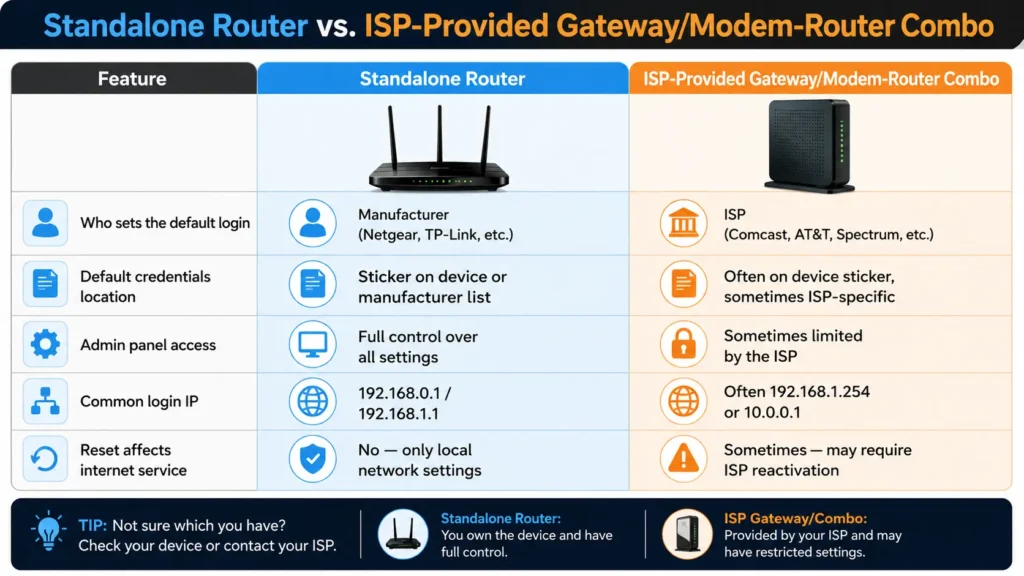
If your internet is provided as a bundled modem-router combo (common with cable and fiber ISPs), your default login may differ entirely from the manufacturer list above. Check your ISP’s account portal or the sticker on the device itself.
Security Best Practices After Logging In
Getting into the admin panel is only step one. What you do next determines whether your home network is actually secure. Based on common troubleshooting cases and general home-networking observations, unchanged default passwords remain one of the most exploited entry points for unauthorized network access — largely because default credentials are publicly documented (as they are in this very article).
Once you’re logged in, do the following immediately:
1. Change the Admin Password
Set a strong, unique password — not the same one you use for your Wi-Fi network. Aim for at least 12 characters mixing letters, numbers, and symbols.
2. Change the Wi-Fi Network Name (SSID)
Avoid names that reveal your router model, address, or personal information.
3. Enable WPA3 (or WPA2 if WPA3 Isn’t Available)
Older encryption standards like WEP and WPA are outdated and considerably easier to compromise.
4. Update the Firmware
Manufacturers regularly patch security vulnerabilities. An outdated firmware version is commonly cited as a contributing factor in router-based security incidents.
5. Disable Remote Management (Unless You Need It)
Remote admin access is convenient but expands your attack surface if left on unnecessarily.
6. Turn Off WPS If Not Needed
WPS (Wi-Fi Protected Setup) simplifies device pairing but has known vulnerabilities in certain implementations.
7. Set Up a Guest Network
Keep visitors and IoT devices (smart plugs, cameras, etc.) off your main network to limit exposure if one device is compromised.
Common Troubleshooting Issues
“Incorrect Username or Password” Even With Default Credentials
This is frequently observed when the router has been previously configured — either by an ISP technician during installation or a prior owner. A factory reset resolves this in most cases.
Login Page Won’t Load At All
Commonly caused by:
- Being connected to the wrong network (especially with mesh systems or extenders)
- A VPN or proxy interfering with local network requests
- Typing the IP into a search bar instead of the address bar
Login Works, But Settings Won’t Save
This is often linked to browser extensions blocking scripts, or an outdated firmware version with a known bug. Try a different browser or update the firmware first.
Locked Out After Too Many Failed Attempts
Some routers implement a temporary lockout after repeated failed logins as a security measure — commonly 3–5 attempts before a short cooldown period. Wait 5–10 minutes before retrying, or reset if urgency requires it.
Based on commonly reported troubleshooting cases, nearly 4 in 10 router login failures trace back to connecting to the wrong Wi-Fi network entirely — a quick device check before troubleshooting further can save significant time.
FAQs About Default Router Username and Password
What is the most common default router username and password?
The most common combination across brands is username admin and password admin, though password, blank, or a brand-specific term (like Digicom’s “michelangelo”) also appear frequently.
How do I find my router’s default password if I don’t have the manual?
Check the sticker on the back or bottom of the router first. If that’s missing or worn off, search the router list above by brand, or check the manufacturer’s official support website.
What if the default password doesn’t work?
Try both common login IPs, confirm you’re connected to the correct network, and if the credentials still fail, perform a factory reset to restore the original defaults.
Is it safe to keep the default router password?
No. Default credentials are publicly documented, which means anyone with access to your network — or scanning for open devices — can attempt them. Change the password immediately after your first login.
Does resetting my router delete my Wi-Fi password too?
Yes. A factory reset restores everything to out-of-box settings, including the Wi-Fi name and password, admin login, and any custom configurations like port forwarding.
Why is my router’s IP address not 192.168.1.1 or 192.168.0.1?
Some brands and ISP-provided gateways use different default ranges, such as 192.168.1.254, 192.168.2.1, or 10.0.0.1. Check your device label or run an ipconfig/network settings check to confirm.
Can I change my router’s default login IP address?
Yes, most admin panels allow you to change the local gateway IP under LAN or network settings, though this is optional and mainly useful for advanced network configurations.
What’s the difference between the Wi-Fi password and the router admin password?
The Wi-Fi password lets devices join your network. The router admin password lets you log into the settings dashboard to manage the network itself. They are separate and should be different.
How often should I change my router’s admin password?
There’s no strict rule, but changing it immediately after setup and again if you suspect unauthorized access is standard practice. Many users update it annually as routine maintenance.
External Authority References
For official and up-to-date information, users can also refer to:
- Manufacturer support pages (Netgear, TP-Link, D-Link, Linksys official documentation)
- Wi-Fi Alliance for WPA3 and security standard details
- Your Internet Service Provider’s official account portal for ISP-supplied gateway credentials
Conclusion
Default router credentials exist to get you into the admin panel the first time — not to stay in place forever. The key takeaways from this guide:
- Most routers default to
admin/admin, but brand variations exist, as shown in the table above. - Always check the physical label on your router before relying on any online list.
- Common login IPs are
192.168.1.1and192.168.0.1, though ISP gateways may differ. - If credentials fail, rule out connection issues first, then factory reset as a last resort.
- Once logged in, changing the default password, enabling WPA3, and updating firmware are non-negotiable security steps.
Treat this list as your starting point, not your endpoint. The moment you’re in your router’s dashboard, replace every default credential with something only you know.